
AI Automation for Businesses: 10 Tasks You Can Automate Today
Explore 10 business tasks you can automate with AI, from customer enquiries and lead follow-ups to documents, reporting and CRM updates.
Introduction
Every business has tasks that need to be done regularly but do not necessarily need to be done manually every time. Responding to routine enquiries, entering customer information, sending follow-ups, preparing reports, and moving data between systems can take up a surprising amount of time.
This is where AI automation for businesses can make a practical difference. Instead of replacing every human task, AI can help handle repetitive parts of a workflow while employees focus on work that requires experience, communication, and decision-making.
For small and growing businesses, the starting point does not have to be complicated. The better approach is to identify where employees spend time on repetitive work, understand the existing process, and then determine whether AI or automation can improve it.
In this guide, we look at 10 business tasks you can automate, how AI automation works, where it can be useful, and what businesses should consider before implementing it.
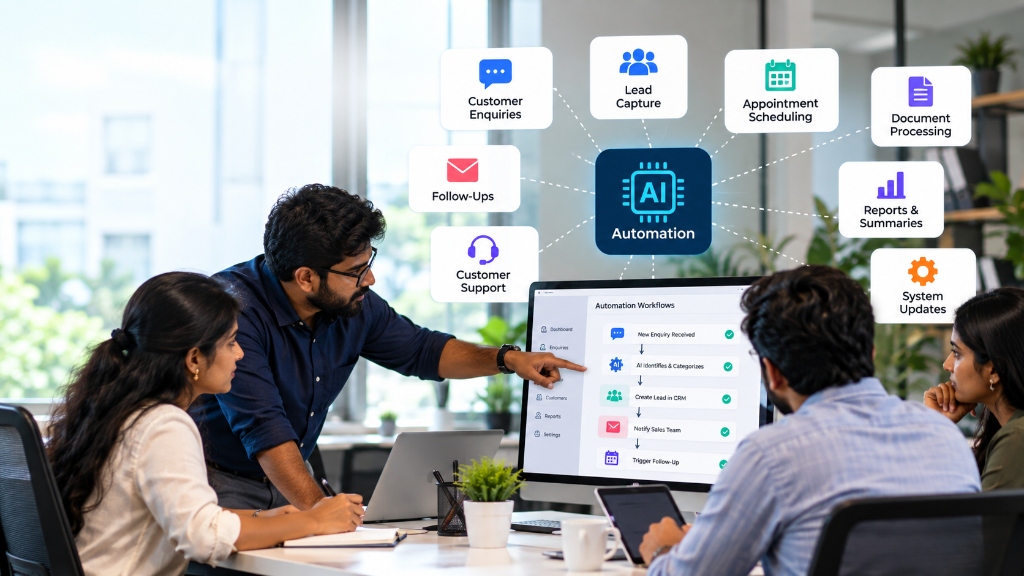
- AI automation for businesses can reduce repetitive manual work across different departments.
- Customer enquiries, lead follow-ups, document processing, reporting, and data entry are common areas for automation.
- AI automation can work alongside existing CRM, ERP, accounting, websites, and other business systems.
- Not every business process should be automated. Tasks requiring human judgment may still need employee involvement.
- A successful automation project starts by understanding the current workflow rather than simply choosing an AI tool.
- Businesses can start with one repetitive process, measure the results, and expand automation gradually.
1. What Is AI Automation for Businesses?
AI automation combines artificial intelligence with automated workflows to handle tasks that would otherwise require repeated manual effort.
Traditional automation generally follows predefined rules. For example, when a customer submits a form, the system can automatically send a confirmation email.
AI automation can handle more flexible inputs. It can help understand customer messages, classify information, summarize documents, extract relevant data, or determine which predefined workflow should happen next.
For example, imagine a company receiving enquiries through its website. Instead of an employee reading every enquiry and manually entering the details into a CRM, an AI-powered workflow could identify the enquiry type, capture important information, create a lead record, and notify the appropriate salesperson.
The employee still remains involved where human communication or judgment is required.
2. How Does AI Automation Work?
An AI automation workflow usually connects several steps instead of treating AI as a standalone tool.
A simple workflow might look like this:
Customer enquiry → AI processes information → Lead is created → Sales team is notified → Follow-up is triggered
The exact workflow depends on the business process.
AI may be used to understand unstructured information, while traditional automation handles the predictable steps around it.
For example, AI could read an incoming email and identify whether it is a sales enquiry, support request, or general question. The automation can then send that information to the appropriate system or employee.
This approach is particularly useful when a business already uses multiple systems such as a website, CRM, accounting system, inventory system, or internal database.
3. 10 Business Tasks You Can Automate Today
Here are 10 common business tasks that organizations can automate to save time and streamline daily operations:
1. Customer Enquiries
Businesses receive customer questions through websites, email, messaging platforms, and other channels.
Many of these enquiries contain similar questions about products, services, pricing, availability, or processes. Employees can spend considerable time reading, sorting, and responding to routine requests.
AI automation can help classify enquiries, provide responses to common questions, collect customer information, and route more complex requests to the right employee.
Example: A customer submits a website enquiry about a product. The system captures the details, identifies the enquiry category, sends an initial response, and alerts the sales team.
The important part is keeping a clear handoff to a person when the customer needs a detailed discussion.
2. Lead Capture and Qualification
Sales teams often receive leads from several sources. Manually transferring information from forms, emails, or messages into a CRM can create unnecessary work.
An automated workflow can capture lead information and organize it based on predefined business criteria.
AI can also help interpret the information provided by a prospect and categorize the enquiry before it reaches the sales team.
Example: A website visitor submits a request for a service. The workflow captures the contact details, identifies the type of requirement, adds the lead to the CRM, and assigns it to the relevant sales team.
3. Lead Follow-Ups
Following up with potential customers is an important part of sales, but it is also easy to miss when employees are managing many enquiries at once.
Automation can trigger reminders and follow-up actions based on predefined conditions.
New lead received → Initial response → Follow-up reminder → Sales review → Next action
AI can help personalize parts of the communication when appropriate, while the sales team can take over when a conversation requires a personal response.
4. Customer Support
Customer support teams often answer the same types of questions repeatedly.
AI automation can help handle common questions, search approved information, classify support requests, and route more complicated issues to employees.
For example, a customer may ask about a service process or request an update. An automated system can provide information when the answer is straightforward and pass the conversation to a support representative when additional investigation is needed.
5. Invoice and Document Processing
Many businesses work with invoices, purchase orders, forms, receipts, applications, and other documents.
Manually reading these documents and entering information into another system can be repetitive.
AI can help extract relevant information from documents and send it into a predefined workflow for review or processing.
Example: Invoice received → Information extracted → Data checked → Approval requested → Accounting system updated
Human review can remain part of the process, particularly when financial information requires verification.
6. Data Entry
Repeated data entry is one of the most common areas businesses look at when considering automation.
Employees may need to enter the same customer, order, or transaction information into multiple systems.
Connecting those systems can reduce duplicate work.
For example, information submitted through a website could automatically be transferred to a CRM. A confirmed order could then trigger updates to another business system.
7. Appointment Scheduling
Appointment-based businesses often spend time handling booking requests, confirmations, reminders, cancellations, and rescheduling.
Automation can manage many of these routine steps.
A customer can submit a booking request, receive available options, confirm an appointment, and receive a reminder without requiring an employee to handle every step manually.
8. Reports and Summaries
Managers often need information from different parts of a business before making decisions.
Preparing reports manually can involve collecting information from spreadsheets, CRM systems, sales records, or other business applications.
Automation can collect information from connected systems and prepare structured reports or summaries.
AI can also help summarize large amounts of information into a format that is easier for a manager or team to review.
9. Approvals and Notifications
Many internal processes depend on approvals.
A purchase request may need manager approval. An employee request may need HR approval. A customer order may require confirmation from another department.
Instead of relying on manual reminders, automation can move the request through predefined stages.
Request submitted → Responsible person notified → Approval recorded → Next team notified → Process completed
10. CRM and Business System Updates
Businesses often use multiple systems to manage different parts of their operations.
A website may collect customer information. A CRM may manage leads. An accounting system may manage financial records. An inventory system may track products.
When these systems do not communicate properly, employees may have to transfer information manually.
AI-powered automation and integrations can help connect these workflows where appropriate.
4. AI Automation Examples Across Business Functions
Here is how AI automation applies across key functional areas of a business:
| Business Function | Possible Automation |
|---|---|
| Sales | Lead capture, qualification and follow-ups |
| Customer Support | FAQ handling and enquiry routing |
| Finance | Document and invoice processing |
| HR | Employee queries, notifications and workflows |
| Operations | Approvals, notifications and process updates |
| Marketing | Content organization and reporting |
| Management | Reports, summaries and business information |
| Administration | Data entry and document workflows |
5. AI Automation vs Traditional Automation
AI automation and traditional automation are related, but they are not exactly the same.
Traditional Automation
Traditional automation generally works with clearly defined rules.
New form submitted → Send confirmation email
The system knows exactly what action to take when a specific event occurs.
AI Automation
AI can add an interpretation step to the workflow.
Customer message received → AI identifies the enquiry type → Appropriate workflow selected → Employee notified
The AI component can help process information that isn't always structured in the same way.
If a simple rule can solve the problem reliably, traditional automation may be enough. AI becomes more useful when the process involves information that requires interpretation, classification, summarization, or natural-language interaction.
6. Benefits of AI Automation for Businesses
Reduces Repetitive Work
Employees can spend less time on routine activities such as copying information, sending standard updates, and organizing basic requests.
Improves Response Time
Automated workflows can trigger actions immediately instead of waiting for someone to manually process each request.
Reduces Duplicate Data Entry
Connecting systems can reduce the need to enter the same information multiple times.
Keeps Processes Organized
A defined workflow makes it easier to understand what happens at each stage and who is responsible for the next action.
Helps Teams Focus on Higher-Value Work
When repetitive tasks are reduced, employees can spend more time on customer relationships, problem-solving, planning, and other work that benefits from human involvement.
Connects Existing Business Systems
Automation can help different applications work together instead of forcing employees to manually move information between them.
7. What Should Businesses Not Automate?
AI automation can be useful, but not every task should be automated.
Businesses should be careful with processes that require significant human judgment, sensitive decisions, or a deep understanding of individual circumstances.
For example, a customer complaint may require empathy and careful communication rather than an automated response. Similarly, important financial, operational, or business decisions may require human review.
Processes that are poorly defined can also create problems.
If a business does not understand how a workflow currently works, automating it may simply make an inefficient process happen faster.
Understand the process first. Automate the right parts second.
Human oversight should remain where it adds value.
8. How to Identify the Right Process to Automate
- Does the task happen frequently? Tasks performed every day or every week may offer more opportunities for automation.
- Is the task repetitive? If employees perform the same sequence of actions repeatedly, it may be worth reviewing.
- Does it involve copying information? Repeatedly transferring information between systems is often a strong candidate.
- Does it consume employee time? A task that takes only a few seconds may not justify automation. A process that consumes hours every week may deserve closer attention.
- Does the process follow clear rules? A defined process is easier to automate and monitor.
- Can the result be reviewed? For AI-based workflows, having a clear review or approval stage can be valuable.
- Can a human take over when necessary? Good automation should have a clear path for human intervention when the situation falls outside the expected workflow.
9. Common AI Automation Mistakes
Automating Before Understanding the Process
A business should first map the existing workflow and identify the actual problem.
Choosing AI Simply Because It Is Popular
Not every business problem needs AI. Sometimes a simple integration or rule-based automation is the better solution.
Removing Human Review Completely
AI can assist with many tasks, but important decisions may still require people.
Ignoring Existing Systems
Automation should fit into the business's current technology environment where possible.
Trying to Automate Everything at Once
Starting with one well-defined workflow makes it easier to test the approach and identify improvements.
Failing to Monitor the Workflow
Automation should be reviewed after implementation. Businesses need to know whether the process is actually saving time and producing the expected results.
10. How to Get Started With AI Automation
Step 1: Identify Repetitive Work
Talk to employees and find out which tasks consume time without requiring much decision-making.
Step 2: Map the Current Workflow
Document what happens from the beginning of the process to the final outcome.
Step 3: Select One Suitable Process
Choose a process that is frequent, repetitive, measurable, and reasonably well defined.
Step 4: Design the Automation
Decide where AI is useful, where traditional automation is enough, which systems need to communicate, and where human approval should remain.
Step 5: Test and Monitor
Run the workflow, review its results, collect feedback from employees, and make improvements.
Step 6: Expand Gradually
Once the first workflow works reliably, the business can evaluate other processes for automation.
Key Questions & Answers
Final Thoughts
AI automation for businesses is not about adding AI to every part of an organization. It is about finding the right processes where technology can reduce repetitive work, connect systems, and help employees spend more time on meaningful tasks.
Customer enquiries, lead follow-ups, document processing, data entry, reporting, approvals, and CRM updates are just some areas businesses can evaluate.
The best place to start is with a real business problem. Understand how the process currently works, identify the repetitive steps, decide where automation can help, and keep people involved where human judgment matters.
For businesses in Tiruchengode, Erode, Coimbatore, and beyond, a practical approach to automation can start with one workflow and grow as the business finds more opportunities to improve the way work gets done.
Related Industry Insights

How Technology Can Help Small Businesses Grow Faster
Learn how websites, ERP, CRM, HRMS, and automation help small businesses save time, reduce errors, and grow faster.

Custom Software vs Off-the-Shelf Software: Which Is Right for Your Business?
Compare custom software and off-the-shelf software based on cost, flexibility, scalability, integrations, and your business requirements.
Looking to automate repetitive business tasks?
Intouch Global Tech helps businesses explore practical technology solutions based on their workflows and operational requirements. From AI-powered automation and business software to system integrations and custom applications, talk to our team today.